
DAKboard: Smart Wall Calendar
DAKboardHouse & Home
0.00.00 Reviews
- Version
- 2.07
- Installs
- 10.00K
- Age Rating
- Everyone
Screenshots
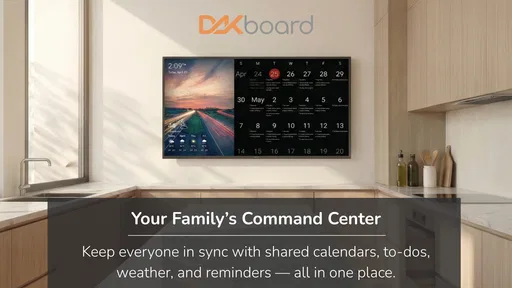
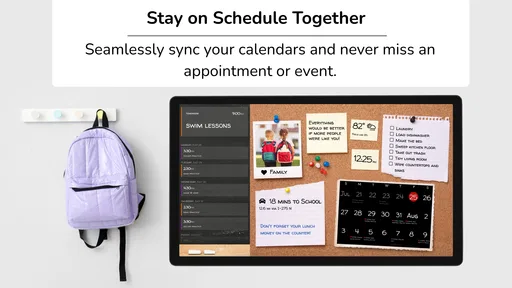
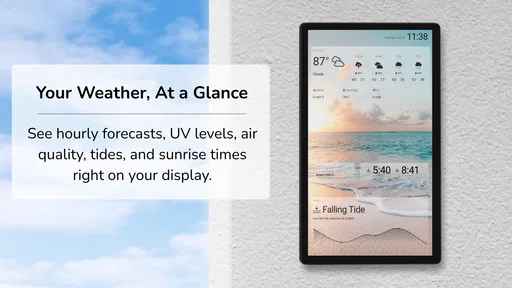
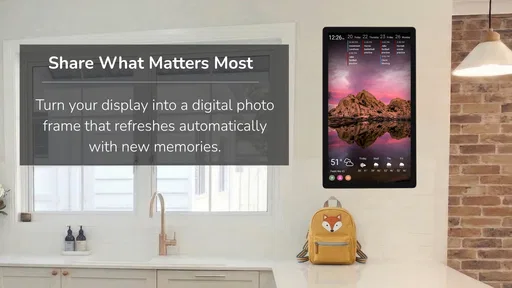
Our Review of DAKboard: Smart Wall Calendar
 Analysis by Appyee
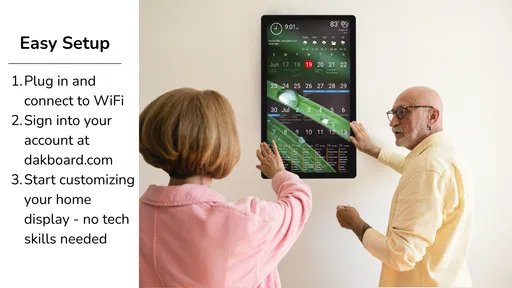
DAKboard: Smart Wall Calendar is the kind of House & Home app that makes the most sense when a household wants information to be visible without asking everyone to check another phone. I approached it as a shared home screen rather than a personal calendar, and that distinction matters. Its purpose is to bring family planning, chores, and smart-home information into one place, with the developer DAKboard aiming at a wall-mounted, always-available view of daily life.
My first impression is that the idea is more useful than the very short store description suggests. A family dashboard can reduce the small interruptions that build up during a busy week: “What time is practice?”, “Who is doing the dishes?”, or “Did anyone check the front door?” The value comes from making those answers visible in a common area. At the same time, this is not automatically a replacement for every calendar, reminder, or smart-home tool. The experience depends heavily on how carefully the household sets up its information and how reliably the display is kept current.
Getting past the first points of friction
The app is free and available to Everyone, which makes it easy to consider for a shared household. It runs on Android from version 8.0 onward, and the current release is 2.07. Those details are reassuring for homes using an older spare device as a dashboard, although compatibility alone does not guarantee that every display arrangement will feel equally smooth. A phone, tablet, and wall-mounted screen each create different practical expectations.
The most common difficulty with a family dashboard is not understanding the basic idea; it is deciding what deserves space on the screen. If every appointment, task, status, and household note is shown at once, the result can become visually noisy. I would begin with only the information the family checks repeatedly. A calendar view, a short chore area, and the most useful home status are a better starting point than trying to represent the entire household on day one.
That initial restraint is one of the best ways to judge whether this app fits your home. DAKboard is designed around shared visibility, so its strength is not private detail. A personal calendar can hold every small reminder, while the wall view should answer the questions that affect more than one person. Keeping those roles separate makes the dashboard easier to read and prevents it from becoming a second, less convenient inbox.
One useful setup habit is to decide who owns each kind of information before entering it. For example, one person might maintain appointments, while another keeps chores practical and current. Without that agreement, the dashboard can look polished but become stale. A chore tracker only helps when tasks are assigned in a way that the household actually follows, and a calendar only helps when changes are reflected promptly.
Check the screen before blaming the app
When something appears missing, I would first check the simple things: whether the device is connected, whether the intended account or source is being used, and whether the screen has had time to refresh. Shared displays are often placed in rooms with uneven wireless coverage, behind furniture, or near appliances and thick walls. A dashboard that works perfectly during setup may behave differently in its final location.
I would also test the display in the exact position where it will live. A bright kitchen, a hallway with glare, or a screen viewed from several steps away can expose problems that are invisible during close-up configuration. Text that looks comfortable on a phone may be harder to scan from across a room. This is not necessarily an application failure; it is a reminder that the dashboard is being used as an environmental display rather than a handheld app.
Another practical check is time. If an event seems to be at the wrong hour, compare the device clock with the calendar source and the household’s actual time zone. Calendar errors are easy to attribute to the dashboard, but mismatched device settings or an incorrectly maintained source can create the same symptom. Confirming the original event elsewhere gives you a clearer answer before changing the dashboard configuration.
For a first trial, I would use a small set of real but non-critical information. Add a few upcoming appointments, a limited chore routine, and one home status that the family genuinely wants to see. Then observe the display through a normal day. This reveals whether the layout is readable, whether updates appear when expected, and whether the household naturally looks at the screen. A test based only on setup success can miss the more important question: does anyone actually use it?
A realistic morning routine
Imagine a family leaving for school and work on a weekday morning. Instead of opening separate apps, someone glances at the shared display near the kitchen. The calendar shows the day’s commitments, the chore area makes the after-school responsibility visible, and the home section provides a quick status check. That is where the concept earns its place: not through elaborate interaction, but through removing several small decisions from a rushed moment.
The trade-off is that the display must be maintained. If yesterday’s chore remains visible, or an appointment changes elsewhere but the dashboard is not refreshed, confidence drops quickly. My advice is to build a short review into an existing routine, such as checking the screen after dinner or before the next day begins. The dashboard should support household habits, not pretend that organization happens automatically.
This also explains why I would avoid putting every family member’s private schedule on the main view. A shared wall screen works best when it shows information people are comfortable seeing in a common space. Personal details can stay in the individual tools where they belong. The dashboard then becomes a coordination layer instead of an exposed copy of everyone’s private planning.
Recovering when the workflow breaks
When a calendar item, chore, or home status does not appear as expected, I would troubleshoot in a fixed order. First, identify whether the problem affects one item or the whole display. One missing appointment points toward the source entry or its visibility settings; a completely unchanged screen points more toward connectivity, refresh, or device state. Separating those cases prevents random changes that make the setup harder to understand.
Next, compare the information at its source with what appears on the dashboard. If the source itself is outdated, correcting the dashboard will not solve the underlying issue. If the source is current but the display is not, give the device a moment to reconnect or refresh, then reopen the relevant view if needed. I prefer small, reversible checks over immediately rebuilding the entire setup.
A helpful recovery technique is to simplify temporarily. Remove or hide one questionable item, confirm that the rest of the dashboard behaves normally, and then add the item back in a controlled way. This is especially useful when a crowded layout makes it difficult to tell whether something is absent or merely hard to find. It also helps reveal whether the issue is with a particular source rather than the complete dashboard.
For chores, recovery is more about workflow than technology. If a task repeatedly remains unfinished, changing its wording or timing may help more than changing the app. “Clean the kitchen” is broad; a smaller, clearly owned task is easier to act on. The tracker can make responsibility visible, but it cannot resolve an assignment that the family considers unfair or too vague. I see that as an important boundary of the feature.
There is another subtle trade-off in using a shared dashboard: visibility can motivate, but it can also create pressure. A household should agree on how the chore view is used before turning it into a public scoreboard. Keeping the language neutral and reviewing assignments together makes the screen feel like a planning aid rather than a source of conflict. That kind of social setup is just as important as the technical setup.
When the problem is somewhere else
Not every incorrect-looking result originates in DAKboard. A source calendar may have been edited on another device, a home device may be offline, or the display itself may have lost its connection. If only one smart-home status is wrong while the calendar remains current, I would investigate that device or its connection first. If every section is frozen, I would start with the display’s network and power state.
It is also worth checking whether the information is simply being interpreted differently than expected. An event may be placed on a different day, a recurring entry may have an exception, or a chore may have been marked complete by another household member. Before changing settings, compare the visible result with the original entry and ask who last edited it. Shared tools make these human details easy to overlook.
The physical device can be the hidden cause as well. A tablet running many other tasks, a screen with aggressive power-saving behavior, or a device that is frequently moved may not provide the stable experience people expect from a wall display. Testing the same account or view on another compatible device can help distinguish an app issue from a hardware or placement issue, without assuming that the software is at fault.
This is where DAKboard differs from a normal personal calendar. A personal calendar is usually judged by quick entry, private reminders, and detailed event management. A wall dashboard is judged by glanceability, shared relevance, and consistency. If your priority is deep personal scheduling, a dedicated calendar may be the better primary tool. If your priority is a visible household overview, this app has a more appropriate role.
Who will get the most from it
I think DAKboard is a good match for families that already have recurring coordination problems and a natural place for a shared screen. It can be useful in a kitchen, entryway, home office, or another area where people pass regularly. It is particularly appealing when different household members use different phones or planning habits, because the display creates one common reference point.
It can also suit someone repurposing an older Android device instead of buying a dedicated screen immediately. Since the app supports Android 8.0 and later, an existing compatible device may be enough for an initial experiment. I would still test readability, charging, screen behavior, and placement before committing to a permanent installation. The cheapest setup is not always the most convenient if the screen is difficult to see or constantly needs attention.
I would be more cautious for a person who wants a private, highly detailed productivity system. The shared format is not ideal for sensitive appointments, extensive notes, or a long list of individual reminders. It is also not the best fit for a household that will not maintain its calendar or chore information. In that situation, the dashboard may become an attractive display of old information, while a simpler personal reminder app remains more dependable.
Another reason to skip it is if your home does not have a stable viewing point. A dashboard hidden in a room nobody enters will not change behavior. Before installing, choose the location based on routine rather than appearance. The best spot is where people naturally pause, not necessarily where the screen looks most decorative.
My practical verdict
DAKboard: Smart Wall Calendar is a focused House & Home app with a sensible idea: turn household coordination into something visible and shared. I like it most when it is treated as a carefully edited overview, not as a dumping ground for every piece of information. The combination of family calendar planning, chore tracking, and smart-home awareness can make a busy home easier to coordinate, especially when the display sits in a high-traffic location.
My main reservation is the amount of responsibility left to the household. The app can gather useful information, but it cannot decide what deserves attention, settle unclear chore assignments, or repair an unreliable source device. Setup discipline matters, and so does regular maintenance. The best results come from starting small, checking the screen in its real location, and giving each section a clear purpose.
DAKboard is free, carries an Everyone age rating, and has passed the ten-thousand-install mark, so it is straightforward to try without turning the experiment into a major purchase. I would begin with a limited dashboard and a few days of observation rather than redesigning the whole family routine around it. If the shared view becomes part of the household’s natural rhythm, it can be genuinely helpful.
For me, the deciding question is simple: do you need a common visual reference for the home, or do you mainly need a private organizer? If it is the first, this app is worth testing. If it is the second, a conventional calendar or task tool will probably be less demanding and more precise. Used within its proper role, DAKboard: Smart Wall Calendar feels practical rather than flashy, and that is exactly why it may work well for the right household.
Verdict
Strengths of DAKboard: Smart Wall Calendar
- Clean, glanceable calendar layout for wall-mounted displays
- Supports multiple calendar providers and useful integrations
- Works well on tablets, TVs, and dedicated dashboard screens
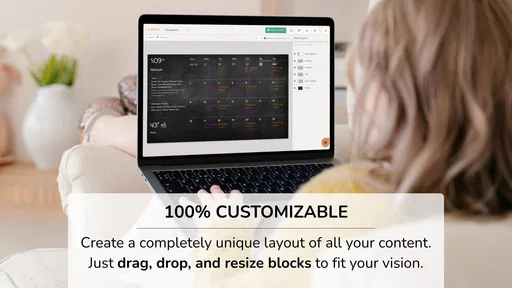
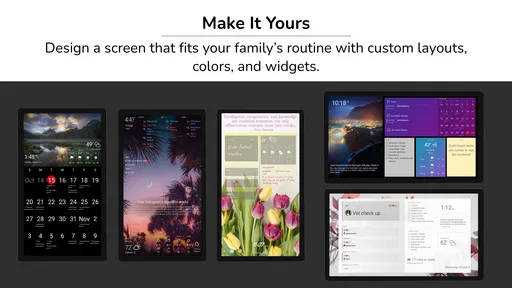
- Customizable screen layouts, themes, and information widgets
- Helpful for coordinating shared family or household schedules
Limitations of DAKboard: Smart Wall Calendar
- Many advanced layouts and integrations require a paid subscription
- Some setup steps may feel complicated for less technical users
- Free plan options are limited compared with the premium tiers
- Constant display use can increase power consumption on older devices
- Internet access is needed for calendars and synced content to update
Similar Picks in This Category
View All
Universal TV Remote Control
CodeMatics Media Solutions3.9

AlfredCamera Home Security app
Alfred Systems Inc.4.7

Planner 5D: AI Home Design
Planner 5D4.5

Universal Tv Remote-Cast to TV
One Music Player4.1

Zillow: Homes for Sale & Rent
Zillow Group4.8

99acres Buy/Rent/Sell Property
infoedge.com4.3
Frequently Asked Questions
What is DAKboard: Smart Wall Calendar, and what can it display?
DAKboard is a digital dashboard designed to turn a tablet, monitor, or other compatible screen into a smart wall calendar and information center. After setting it up, you can display calendars, weather forecasts, photos, news, tasks, reminders, and other widgets in one customizable layout. It is particularly useful for kitchens, offices, family rooms, and shared household spaces where everyone needs to see the same information.
Does DAKboard work with Google Calendar, Apple Calendar, or other services?
DAKboard is designed to connect with popular calendar and productivity services, although the exact integrations and available features can depend on your subscription and account configuration. Users commonly connect calendars from services such as Google or Apple, then choose which events, schedules, or shared calendars appear on the screen. Before downloading, check the current integration list to confirm that your preferred provider is supported.
Can I use DAKboard on a normal Android or iPhone screen?
DAKboard can be viewed through supported devices and web browsers, but the experience may differ depending on the hardware and operating system. A tablet, dedicated display, computer, or compatible wall-mounted screen is generally more practical for continuous use than a phone. Some features may also require a DAKboard display or a paid plan, so verify device compatibility and display requirements before purchasing equipment.
Is DAKboard free, or do I need a subscription?
DAKboard offers different plans, and the features available to you may vary between free and paid options. Basic use may be enough for a simple calendar or dashboard, while advanced layouts, additional integrations, multiple screens, photo features, and more detailed customization can require a subscription. Review the current pricing and plan limits carefully, especially if you intend to use several displays or share the dashboard with your family.
Is DAKboard difficult to set up and customize?
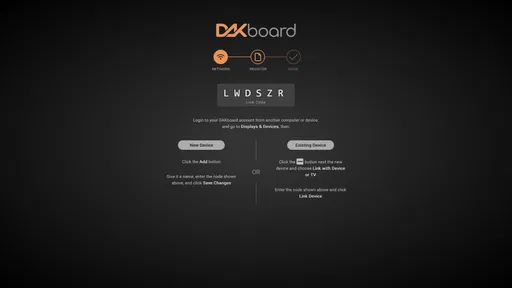
Initial setup is generally manageable, but creating a polished wall display can take some time because you need to connect accounts, choose widgets, adjust layouts, and configure screen behavior. The process is easier if you already know which calendars and information you want to show. Users should also consider privacy, since the display may reveal appointments, names, or personal photos in a shared area. Test the layout before mounting the screen permanently.
